


CoolRead- Enchanting Reads
4.340.00 Reviews
App Specs
- Version
- 1.4.1
- Updated On
- License
- Free
- Downloads
- 10,000+
- Developer
- Apps and Live Wallpapers by Juu
- Categories
- Personalization
- Platform
- Android
Screenshots
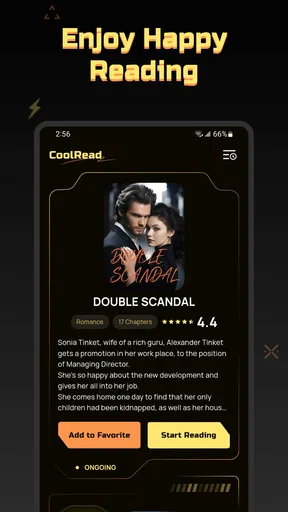
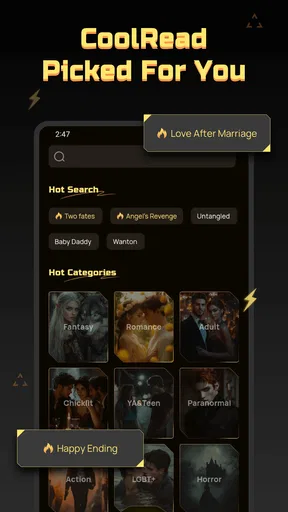
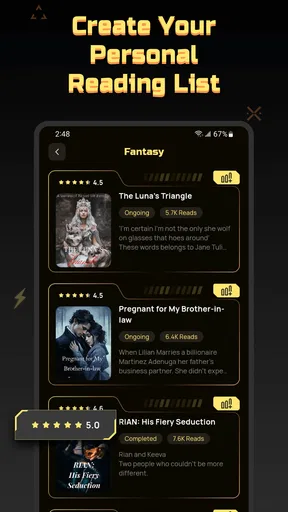
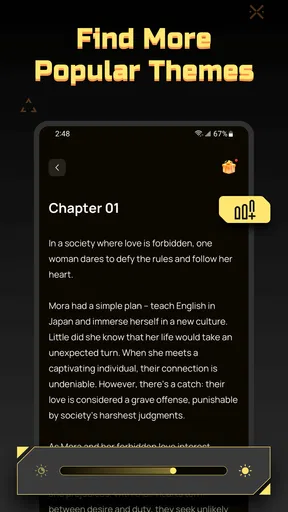
 Analysis by AppCompare
I approached CoolRead- Enchanting Reads as a reading app first, not as a general entertainment platform. Its place in the Personalization category is slightly unusual, because the appeal is less about changing the look of a phone and more about making reading feel like a comfortable part of everyday device use. The central idea is simple: discover a story, open it when you have time, and continue reading without needing a complicated setup.
That simplicity is useful, but it also means the experience depends heavily on how well the app fits your habits. I found it most appealing for short reading sessions, casual discovery, and people who want stories available on a phone rather than tied to a physical book. It is free to install, although optional in-app purchases range from less than a dollar to just under a hundred dollars per item. That difference matters, especially if you are trying to keep reading completely cost-free.
The app comes from Apps and Live Wallpapers by Juu, and it carries a Mature 17+ content rating. I would therefore treat it as an adult-oriented reading choice rather than something to hand to a younger reader without checking the material. The current release is version 1.4.1, and it runs on Android seven or later, so compatibility should cover many older phones as well as newer devices.
How the reading experience handles different needs
I look at the reading experience through the needs it has to serve: a quick, low-effort way into a story, and enough comfort to make returning worthwhile. In the next section, I’ll focus on the practical choices that can make phone reading feel more personal without assuming every reader wants the same setup. One useful test is to notice not only whether a page is readable, but whether you can settle into it without repeatedly adjusting your device.
Readability and navigation in ordinary use
My first test with a reading app is not whether it looks impressive in a screenshot. I want to know whether I can open it, find something interesting, start reading, and return later without feeling lost. CoolRead- Enchanting Reads is strongest when I treat it as a low-pressure reading shelf. The store summary presents it as a place to discover a favorite story and read whenever it suits you, and that purpose comes through in the uncomplicated nature of the experience.
For readers who prefer a calm, direct route from discovery to reading, this is a sensible approach. You do not need to think of it as a large library-management project. I can imagine opening it during a commute, browsing for a few minutes, and choosing something based on mood rather than building a carefully organized collection. That makes it approachable for someone who is new to digital reading or who finds feature-heavy book apps tiring.
The important trade-off is that a simple reading flow does not automatically solve every readability problem. People have different needs: some want large type, some prefer tightly packed text to reduce scrolling, and others need strong contrast or a particular font shape. I would not assume that an attractive interface is automatically comfortable for long sessions. Before committing to extended reading, I would spend a few minutes checking how the text feels on your own phone, at your own brightness level, and with your usual system settings.
Worth Reading Before You Choose

EA SPORTS FC Mobile 26 Is a Bigger Football Game, but It Takes Time

Flipboard Shows What News Apps Must Do Beyond the Feed

Switching to Android Auto Means Rethinking Your Driving Routine

Google Calendar Makes a Crowded Week Easier to Manage

Ludo King Makes the Most of the Minutes Between Plans

Baby Panda World Brings Quick Play to Modern Phones, but Its Game Library Feels Busy
That personal check is especially valuable for readers with dyslexia, low vision, migraines, or visual fatigue. A layout that feels fine for a short sample can become irritating after half an hour. My practical advice is to test CoolRead in the same conditions in which you expect to use it: in bed, outdoors, on public transport, or in a dim room. Reading comfort is not a fixed quality of the app alone; it depends on the interaction between its presentation and your device.
Navigation also has an accessibility angle that is easy to overlook. A reader who has difficulty with precise taps benefits from clear, forgiving controls and a predictable path back to the current story. A reader with attention or memory challenges benefits from not having to remember several steps. CoolRead is a better match for those users when they want a straightforward reading routine rather than a dense set of filters, shelves, and social functions.
One useful workflow is to treat discovery and reading as separate moments. I would browse when I have energy, choose one story, and then return to that choice later instead of repeatedly searching when I am tired. This reduces decision fatigue and makes the app more suitable for evening reading. It is a small habit, but it changes the experience from endless browsing into a dependable wind-down routine.
Motor and sensory considerations
Reading on a touchscreen can create physical friction even when the content itself is enjoyable. Frequent scrolling, small buttons, accidental taps, and repeated gestures can be uncomfortable for people with tremors, limited dexterity, joint pain, or one-handed phone use. CoolRead is easiest to recommend for users who can comfortably perform ordinary phone gestures, but I would be cautious about assuming that every interaction will suit every motor ability.
If you read while holding a phone in one hand, try positioning the device so that you do not need to stretch your thumb across the screen. A stand or a stable surface may make a bigger difference than any individual app setting. This is particularly useful for readers who enjoy longer sessions but experience hand fatigue. The app can provide the reading material, yet your setup determines whether the session is physically sustainable.
People who are sensitive to bright screens may also need to adjust their surroundings rather than relying on the app alone. I would lower the phone brightness, avoid reading directly under harsh lighting, and use the device’s built-in display controls if the page feels too intense. Those changes are practical because sensory comfort can vary widely from one person to another, and a setting that helps one reader may not help the next.
For users with hearing loss, the app’s basic purpose is naturally less dependent on sound than video or music services. That makes reading a quieter activity for people who prefer not to manage audio. It is also convenient in shared spaces, where headphones are unavailable or unwanted. However, anyone who depends on spoken content, text-to-speech, or audio alternatives should test the app with the accessibility tools already available on their device rather than assuming that every reading screen will behave perfectly with them.
I also see a benefit for people who become overwhelmed by animated or noisy applications. A story-focused app can be easier to approach than a social feed full of constant visual changes. Still, I would judge the actual screen in use, not just the category label. If you are sensitive to motion, brightness, or crowded layouts, open the app during a quiet moment and see whether its presentation helps you settle into reading or creates another source of stimulation.
A less obvious consideration is posture. Many people read on a phone with their neck bent forward, then blame the app when discomfort builds. I recommend shorter sessions with deliberate pauses, especially when testing whether CoolRead fits your routine. For someone with chronic pain or limited mobility, the best arrangement may be a phone stand and an external control method supported by the device, if that setup works with the app. The key point is that the app should fit into an accessible reading position, not force you to maintain an uncomfortable one.
Situational access beyond the ideal reading session
The strongest everyday use case is the in-between moment: waiting for an appointment, taking a break, or settling down before sleep. CoolRead makes sense for readers who want to turn those small gaps into reading time without carrying a physical book. I especially like the idea of using it as a low-commitment alternative to scrolling through social media. Even a short chapter or a few pages can feel more intentional than opening an endless feed.
It may also suit people whose schedules change constantly. A parent waiting during an activity, a commuter with an unpredictable journey, or a worker taking irregular breaks can open a story when a window appears and stop when the moment ends. That flexibility is central to the app’s appeal. You do not need to reserve an entire evening for reading to get value from it.
At the same time, phone reading is not equally practical in every setting. Outdoors, glare can make text difficult to see. On a crowded bus, holding a phone steady may be awkward. At night, a bright screen can disturb someone nearby. If you regularly read in those conditions, an e-reader or a physical book may be more comfortable. CoolRead is convenient because it is on a phone, but the same convenience exposes it to the phone’s environmental weaknesses.
Travel is another situation where expectations matter. A reading app can be a good companion when you have reliable access to your device, but I would not plan an entire trip around it without first checking how your normal reading routine behaves when connectivity is limited. Since the most important question is whether your chosen material remains available when you need it, test that before leaving home rather than discovering a problem during a long wait.
For readers with limited data, battery concerns, or shared devices, the app may require more planning than a paperback. I would open it on Wi-Fi, prepare the story I want, and keep the phone charged before a long journey. This kind of preparation is not glamorous, but it is the difference between a useful travel companion and an app that becomes unavailable at the wrong time.
The Mature 17+ rating also affects situational access. I would not use this as a family reading app or recommend it casually to teenagers. If several people share a tablet or phone, consider who can open the application and whether the device is used by children. That is a real-world concern, not merely a label to ignore. Adults looking for personal reading can treat the rating as a reminder to choose the app for the right audience.
Where the experience still has barriers
My biggest reservation is that a reading app can appear welcoming while leaving the most important comfort questions to the user. If you need highly specific control over typography, spacing, contrast, navigation, or alternative access methods, you should compare CoolRead with a dedicated e-reader or a mature digital library app before settling in. Those alternatives may offer a deeper accessibility toolkit, even if they feel less lightweight.
The free price is helpful for trying the experience, but the optional purchase range deserves attention. A reader who only wants occasional free reading may be perfectly comfortable avoiding purchases. Someone who becomes invested in particular stories could encounter a different cost pattern over time. I would set a personal spending limit before browsing, especially if the app makes it easy to continue from one appealing story to the next.
Another barrier is the difference between discovery and control. CoolRead is attractive to readers who want suggestions and a relaxed way to find something new. It may be less suitable for someone who already owns a large digital collection and needs advanced sorting, file management, detailed annotations, or precise library organization. In that situation, a conventional e-book reader may be the better tool, even if it feels less spontaneous.
I would also avoid treating the rating as proof that the app will suit every adult. A Mature 17+ label tells you the intended age group, but it does not replace your own judgment about themes or tone. If you are sensitive to particular subjects, preview the material and choose carefully. This is especially important when recommending the app to a friend, because “adult-oriented” does not mean “comfortable for every adult.”
Performance expectations should remain realistic as well. The app has passed the early stage of being a brand-new release, but its user base is still modest: it has reached over ten thousand installs and holds a 4.3 average from roughly two hundred ratings, with around forty written reviews. Those figures suggest encouraging early interest, yet they do not give me the same confidence I would have in a platform tested by a huge, varied audience. I would try it personally rather than assuming it will match the polish of the biggest reading services.
That smaller scale can be a positive for someone who wants a less intimidating starting point. It can also be a drawback for readers who depend on extensive community discussion, long-established support resources, or a large ecosystem of compatible tools. The right choice depends on whether you value a focused reading experience more than a broad, proven platform.
Who should try it, and who should choose something else
I would recommend CoolRead to an adult who wants a simple way to discover stories on an Android phone, enjoys reading in short bursts, and does not need a complex personal library. It is also worth trying if you are replacing idle scrolling with a more purposeful activity and want to begin without paying upfront. The free entry point lowers the risk of testing it during a normal week.
I would be more selective for readers with strong accessibility requirements. That does not mean the app is unsuitable; it means the decision should be based on hands-on testing with your own device settings and assistive tools. If you need dependable control over every aspect of text presentation, a specialist reading application may be a safer first choice. CoolRead works best when its available reading flow already feels comfortable to you.
I would also point frequent travelers, offline-first readers, and people with limited mobile data toward an app whose storage and offline behavior are clearly central to their routine. For them, convenience is not just opening a story quickly; it is knowing that the story will remain usable in a low-connectivity environment. CoolRead can still be part of the comparison, but it should earn that place through your own travel test.
On the other hand, someone who wants a gentle discovery experience may find a better fit here than in a feature-heavy service. The absence of a complicated workflow can be a strength for people who become discouraged by too many choices. I would start with one short session, check whether the text feels comfortable, and decide from that experience rather than from the store description alone.
My inclusive verdict after using it
CoolRead- Enchanting Reads is a promising personal reading app for adults who want stories to fit around real life. I like its low-pressure concept, its free starting point, and the way it can turn spare minutes into a more satisfying habit. The app is especially convincing when used as a simple doorway into reading rather than as a full replacement for every kind of digital book service.
Its inclusive value is more conditional. Readers with different visual, motor, sensory, or situational needs may find it comfortable, but they should test it in the exact environments that matter to them. A dark bedroom, a bright street, a one-handed commute, and a long quiet session all reveal different barriers. No single setup represents every reader.
My final recommendation is to try it if you are an adult looking for casual story discovery and a straightforward phone-based reading routine. Keep purchases deliberate, check the content suitability for your household, and compare it with a dedicated e-reader if typography control, offline reliability, or advanced organization is essential. The best reason to choose CoolRead is its approachable reading rhythm, not a promise that it will solve every accessibility or library-management need.
Pros
- Curated stories make it easy to discover new reading material.
- Clean interface keeps browsing and reading pleasantly distraction-free.
- Suitable for short reading sessions during commutes or breaks.
- Regularly refreshed content can keep the library feeling engaging.
- Lightweight design should run smoothly on most modern devices.
Cons
- The selection may feel limited for readers seeking specific genres.
- Some stories may vary noticeably in writing quality.
- Offline reading options may not cover every available title.
- Personalization tools could be less detailed than dedicated reading apps.
- Frequent readers may find the catalog becomes repetitive over time.
FAQs for CoolRead- Enchanting Reads
What is CoolRead- Enchanting Reads, and what can I do with it?
CoolRead- Enchanting Reads is a mobile reading app designed for users who enjoy discovering and reading digital stories in a convenient format. It typically provides access to a selection of novels, serialized fiction, romance, fantasy, and other entertaining titles. Depending on the available catalog, you may browse recommendations, save interesting books, continue reading from where you stopped, and adjust the reading experience to suit your preferences.
Is CoolRead- Enchanting Reads free to download and use?
The application may be available to download at no initial cost, but some books, chapters, features, or reading credits can require payment. Before downloading, users should check the app store listing and review the in-app purchase information carefully. Pricing, subscription options, advertisements, and access restrictions may vary by region, device, promotional offer, and the specific content selected.
Does CoolRead- Enchanting Reads require an internet connection?
An internet connection is generally needed to download the application, browse the catalog, load new chapters, synchronize reading progress, and access account-related features. Some content may be available for offline reading if the app supports downloads, although this can depend on the title and account permissions. It is advisable to test downloaded books before traveling or relying on the app without mobile data.
Is CoolRead- Enchanting Reads suitable for children and teenagers?
Suitability depends on the stories included in the catalog, since digital reading platforms can contain different genres, themes, and maturity levels. Parents and guardians should review the app’s age rating, content descriptions, privacy information, and any available parental controls before allowing younger users to access it. Some books may include romance, violence, emotional topics, or other material intended for older readers.
What privacy and account permissions should I consider before installing it?
Before installing CoolRead- Enchanting Reads, review the permissions requested during setup and the developer’s privacy policy. Reading apps may collect information such as account details, device identifiers, usage activity, reading preferences, or purchase records to operate and personalize the service. Avoid providing unnecessary personal information, use a strong password, and check subscription settings carefully if you create an account or enable payments.


